
No-Code Chatbot Builder: The Complete Guide
Everything marketing, sales, and ops teams need to know about building, deploying, and scaling chatbots — without writing a single line of code.
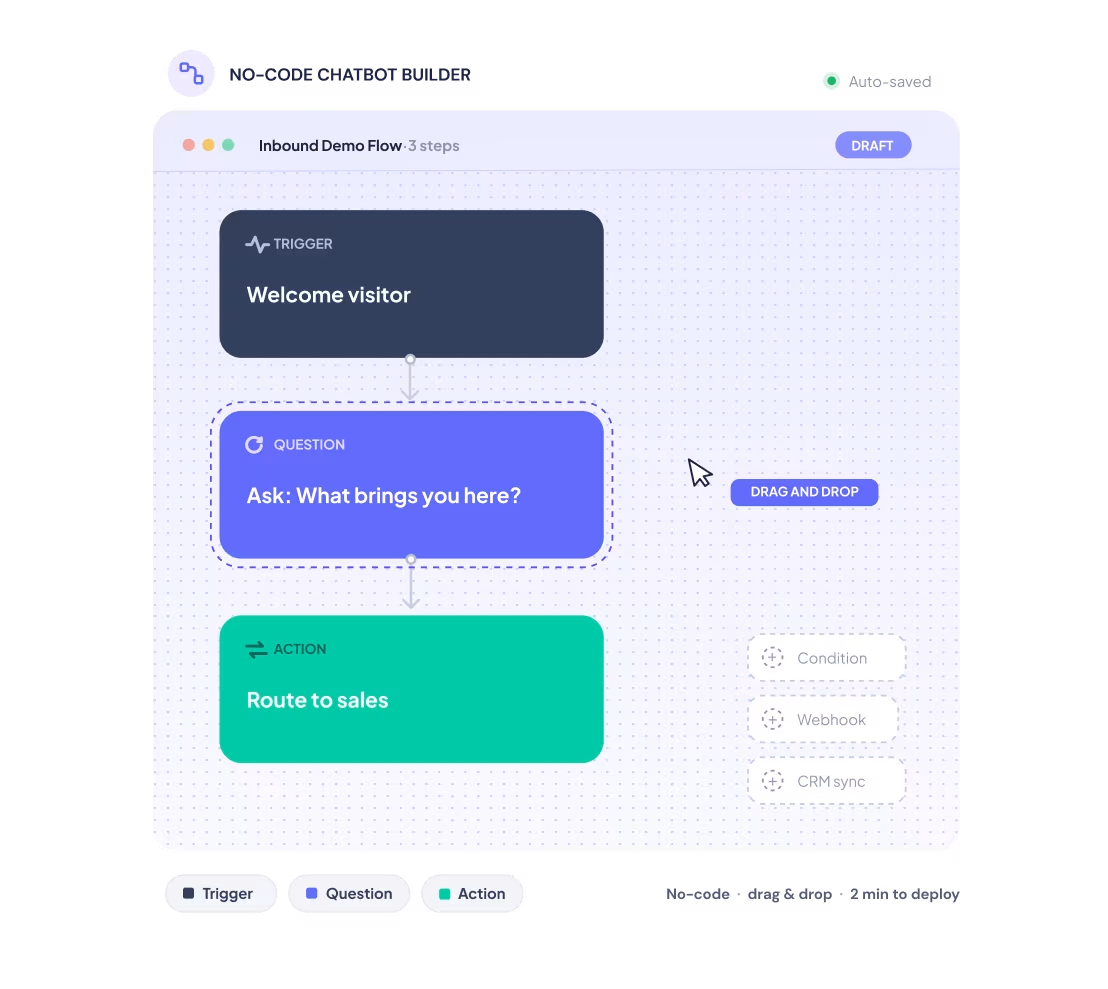
What is a no-code chatbot builder and how does it work?
This guide explains what a no-code chatbot builder is — a visual platform that lets non-technical teams create and deploy conversational flows without code — what you can realistically build with one, and when to upgrade to an AI agent.
A no-code chatbot builder is the fastest way for non-technical teams to deploy conversational experiences on their website, CRM, or messaging channels — without waiting for developer resources.
1. What is a no-code chatbot builder?
The definition
A no-code chatbot builder is a software platform that lets non-technical users create, configure, and deploy automated conversational flows through a visual interface — without writing code. Instead of programming logic in a development environment, users drag and drop conversation blocks, define branching conditions, connect integrations, and publish directly from a browser-based editor.
The "no-code" part is not a compromise on capability. Modern no-code chatbot builders connect to CRMs, route conversations based on complex conditions, pass data between systems, and — in the most advanced platforms — run AI reasoning layers on top of structured flows. The difference from traditional chatbot development is who can build it: a marketing manager, a growth analyst, or an operations lead — not a software engineer.
What a no-code chatbot builder actually does
At its core, a no-code chatbot builder does four things:
- Designs the conversation. You define what the chatbot says, what questions it asks, and what happens based on each answer. This is done through a visual flow editor, not code.
- Stores and routes data. Every answer a visitor gives is captured, stored, and can be passed to other systems — CRM, spreadsheet, email tool — without manual work.
- Deploys to a channel. The finished chatbot is embedded on a website, linked as a standalone page, or connected to a messaging channel like WhatsApp. No developer handoff required.
- Iterates without engineering. When you need to update the flow, change a question, or add a new branch, you open the builder and change it yourself. No ticket, no sprint, no waiting.
Where no-code chatbot builders fit in the stack
A no-code chatbot builder sits between your traffic and your CRM. It is the layer that converts anonymous visitors into identified, qualified contacts — and routes that data downstream into whatever tools your team already uses.
2. What you can build: Use cases for growth and ops teams
No-code chatbot builders are most commonly deployed as website chatbots, but the use cases extend well beyond a contact form replacement. The same platform that handles marketing lead capture can run customer support deflection or onboard a new employee — without touching code.
Chatbot for lead generation
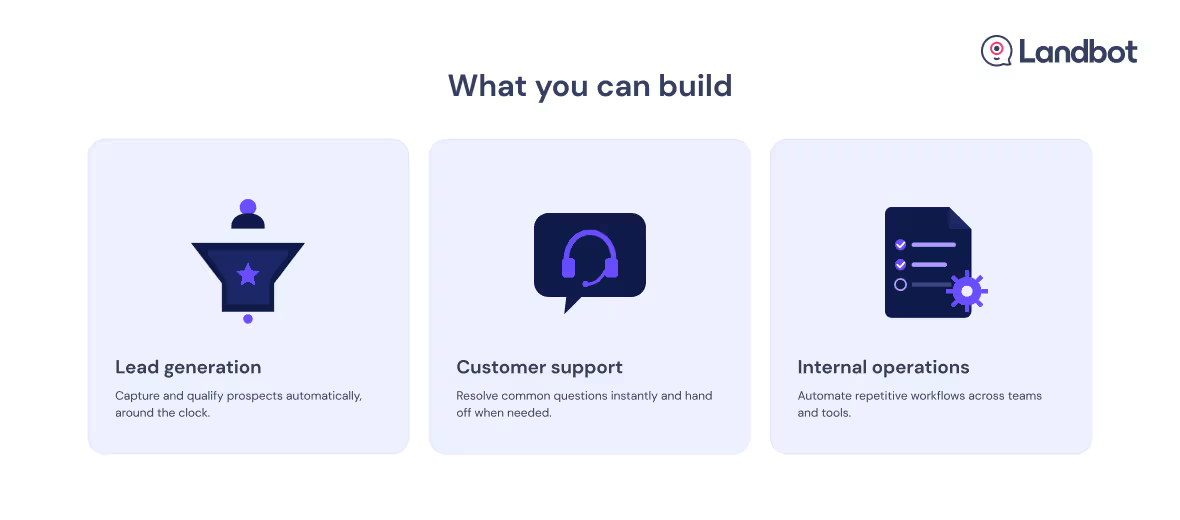
The most direct use case: replace or supplement your static contact form with a conversational flow that qualifies visitors in real time. A chatbot for lead generation asks the right questions, scores the lead based on the answers, and routes high-intent visitors to sales — or nurtures lower-intent visitors into a sequence. Becomeyoo ran an A/B test comparing Landbot's conversational flow against their static form and generated 30% more leads at 30% lower cost per lead. For a step-by-step walkthrough of how to build one from scratch, see our lead generation chatbot tutorial.
The full breakdown of AI-powered lead generation flows — qualification logic, routing, and pipeline impact.
Customer support
A support chatbot handles the tier-1 load: FAQs, order status, account questions, troubleshooting flows. Well-designed support flows resolve 40–60% of queries without human intervention, freeing your team for the conversations that actually need them. When the bot can't resolve the query, it captures context and routes to the right agent — so the handoff is warm.
Internal operations
Teams use no-code chatbots for internal workflows that rarely make it onto a product roadmap: HR onboarding questionnaires, IT helpdesk triage, policy FAQs, expense submission flows. The advantage is speed — a non-developer can build and deploy an internal bot in an afternoon, iterate based on feedback, and own it without filing a support ticket.
3. How no-code chatbot builders work
The visual flow editor
The foundation of every no-code chatbot builder is a canvas-based editor where you build conversation flows by connecting blocks. Each block represents one step in the conversation: a message, a question, a condition, or an action. You connect them with arrows that represent the paths a user can take.
The logic is visual — branching conditions are set by drawing connections between blocks, not writing if/else statements. This is what makes the builder genuinely accessible to non-developers: the logic is spatial, not syntactic.
AI layers on top of structured flows
Modern no-code chatbot builders layer AI reasoning on top of structured flows. This means the chatbot can understand free-text answers rather than requiring button selections, interpret intent when a user's answer is ambiguous, and generate natural-sounding responses rather than scripted text.
The AI layer handles the unpredictable parts of conversation. The structured flow handles the parts that must be consistent: data collection, routing logic, CRM updates. Together they produce an experience that feels natural without sacrificing reliability.
Templates as starting points
Most no-code builders include a template library: pre-built flows for the most common use cases — lead generation, FAQ, appointment booking, customer support. A template gives you a working chatbot in minutes. For teams building their first chatbot, starting from a template is almost always faster than starting from a blank canvas.
Testing and preview environments
Professional no-code chatbot builders include a live preview environment where you simulate the conversation before publishing. You test every branch, confirm integrations are firing correctly, and catch logic errors — all without touching production.
4. Features that separate a good builder from a great one
Not all chatbot software is created equal. When evaluating a chatbot platform, these are the capabilities that separate a tool you'll outgrow in six months from one that scales with your team.
Feature 1: Conditional logic depth. Basic builders support simple branching. Advanced builders support nested conditions, score-based routing, and multi-variable logic — the kind of qualification flow a real sales process requires. If the builder cannot route based on a combination of company size, industry, and stated use case simultaneously, it will hit its ceiling fast.
Feature 2: Native integrations. Every lead captured in a chatbot needs to go somewhere useful. Look for native integrations with the tools your team actually uses: HubSpot, Salesforce, Google Sheets, Calendly, Slack, Zapier. Native integrations — built into the platform, not custom-coded — are what keep the "no-code" promise real across your entire stack.
Feature 3: Deployment flexibility. A good chatbot maker deploys everywhere: embedded widget, full-page experience, iframe, pop-up, WhatsApp. Your use cases will evolve — you do not want to switch platforms when you decide to add a new channel.
Feature 4: No-code with power-user depth. The best builders have a simple surface and a deep core. Non-technical users can build and iterate without friction. Power users comfortable with variables, webhooks, and APIs can go deeper without switching tools.
Feature 5: Built-in analytics. You need to know where conversations drop off, which paths convert, and what questions lose people. Built-in analytics and the ability to test variants are not optional — they are what turns a chatbot from a one-time launch into a learning system.
Feature 6: GDPR and compliance controls. If you are collecting personal data in conversation the builder must support GDPR-compliant data handling: consent collection, data deletion, geographic data routing. This is table stakes for any team operating in Europe.
See everything you just read — in action.
Build your first chatbot.svg)
Free plan available
No credit card required
Setup in minutes
5. How to build and deploy your first chatbot
Most teams ship their first chatbot in under a day. Here's the sequence — and for the full breakdown of website embed options and setup, our guide to creating a chatbot for your website covers the details.
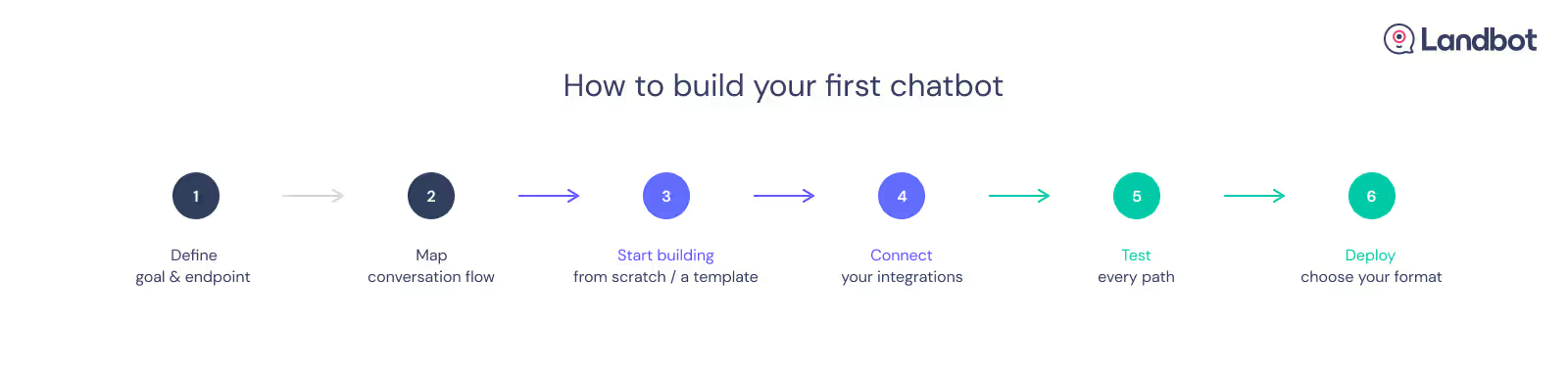
- Define the goal and the conversation endpoint. Every chatbot should have one primary job. Before opening the builder, write one sentence: "At the end of this conversation, the visitor will have [done X] and we will have [captured Y]." If you cannot write that sentence, the chatbot is not ready to be built.
- Map the conversation flow before building it. Sketch the main path and the two or three most common branch conditions before opening the canvas. Identify where the conversation can end early, where it can accelerate for high-intent visitors, and where it needs a fallback. Building a map first saves significant iteration time.
- Choose your starting point. Open the template library and find the closest match to your use case, or start from a blank flow if none fits. Either way, customize the questions, branding, and branching logic to match your actual qualification criteria before moving on.
- Connect your integrations. Before testing, connect the chatbot to wherever the captured data needs to go: your CRM, a Google Sheet, your email platform. Use native integrations where available. Test each connection with a dummy conversation.
- Test every path. Use the preview environment to walk every branch. Check that conditions fire correctly, integrations receive the right data, and fallback paths work. Do not publish until you have tested the failure states, not just the happy path.
- Deploy. Choose your deployment format: embedded widget (a script tag into your site), full-page URL, or a pop-up triggered by scroll depth or exit intent. For a website chatbot, deployment takes under ten minutes.
Pro tip: Launch with the simplest version of the flow that achieves the goal. Add complexity in iterations based on what the conversation data shows — not based on what you assume visitors will need.
6. The integration layer: Connecting your chatbot to your stack without writing code
One of the most common objections to no-code chatbot builders is the assumption that "no-code" means "disconnected." It does not. The value of a chatbot is not the conversation itself — it is what happens to the data after the conversation ends. That requires integrations.
The integrations that matter most
CRM (HubSpot, Salesforce, Pipedrive). Every lead captured in a chatbot should flow directly into your CRM as a new contact or deal, with all conversation data mapped to the right fields. Native CRM integrations handle this without custom code — and without a developer involved.
Calendar and booking tools (Calendly). A lead qualification chatbot that ends by booking a meeting closes the loop in a single conversation. Native calendar integrations surface available slots and confirm bookings in real time — no handoff email required.
Data and spreadsheets (Google Sheets, Airtable). For teams not yet on a full CRM, Google Sheets is often the first data destination. Native integrations push every conversation's captured data to a structured row — timestamped and ready to analyse.
Notification tools (Slack, email). When a high-intent lead completes a qualifying conversation, your sales team needs to know immediately. Slack integrations send real-time alerts with full conversation context — not just a name and email address.
Marketing automation (Mailchimp, Sendgrid). Chatbot conversations are consent-captured data collection moments. Native integrations push new contacts directly into email sequences, nurture flows, or retargeting lists the moment the conversation ends.
What "no-code integration" actually means in practice
A native integration means you connect the tool through an authenticated UI — you log in, map fields, and save. No webhooks to configure, no JSON to write, no developer to brief. The chatbot platform handles the API call in the background.
When a native integration does not exist, most no-code builders connect to Zapier or Make — which unlocks thousands of additional tools through a no-code automation layer. The principle is the same: your team owns the connection, not engineering.
Landbot connects natively to HubSpot, Salesforce, Google Sheets, Calendly, Slack, and more.
7. When NOT to use a chatbot (and what to use instead)
Chatbots are powerful, but they are not always the right tool. Deploying one in the wrong context wastes build time and creates a worse experience than the alternative.
When a static form is better
Use a static form when the data you need is simple and structured, and the visitor is already highly motivated. If the visitor is already sold and just needs a box to fill in, a form wins. For a deeper look at where each format performs better, see this article.
When live chat is better
Use live chat when the outcome depends on human judgement that cannot be scripted in advance — a churn risk that needs a retention conversation, a high-value prospect asking questions that require a sales rep's intuition, a complaint where tone matters as much as information. A chatbot can and should handle the front end: collecting context, identifying the situation, and routing to the right agent with everything already loaded. The resolution, however, should be human. The most effective setups don't choose between chatbot and live chat — they sequence them.
When neither is enough
When your use case requires autonomous reasoning across multiple turns — not just collecting answers but interpreting them, making decisions, and taking actions in connected systems — a structured chatbot reaches its ceiling. That is when you are looking at an AI agent, not a chatbot. Section 8 covers that transition in full.
8. Chatbot vs AI agent: Knowing when to upgrade
What the difference actually is
A chatbot follows a structured flow you designed in advance. It asks predefined questions, follows the branching logic you configured, and captures the data you decided to collect. It is predictable, auditable, and fast to build.
An AI agent reasons about goals. It decides which questions to ask based on the conversation so far, interprets free-text answers, and can take actions in connected systems. The practical distinction: a chatbot executes a conversation you designed. An AI agent conducts a conversation to achieve an outcome you defined. If you're unsure which one Landbot is — the answer is both, and this post explains exactly how the two modes relate.
When you have outgrown a chatbot
Signal 1: Your flows are getting too complex. If your chatbot has 40+ blocks and your team dreads updating it because one change breaks three branches, you have hit the chatbot ceiling. An AI agent handles conversation complexity through reasoning — not through an increasingly tangled flow.
Signal 2: Visitors regularly give answers your flow did not anticipate. When visitors reach dead ends because their answer did not fit a button option, the structured flow is working against you. An AI agent understands natural language — it does not need predetermined choices.
Signal 3: You need the chatbot to take actions, not just collect data. A chatbot captures and routes. An AI agent can look up a record in your CRM, update a deal stage, and send a follow-up — all within the same conversation. If you need the conversation to do things, not just ask things, you need an agent.
Signal 4: Qualification depth is the bottleneck. If your sales team says leads are coming through but are not qualified enough, the chatbot is capturing but not evaluating. An AI agent qualifies through reasoning — it can probe, follow up, and assess in ways a fixed flow cannot.
The upgrade path in Landbot
Landbot is an AI agent platform for website conversion — built on a no-code chatbot builder. The same visual builder you use to create chatbots is the environment in which you add AI reasoning layers, connect to knowledge bases, and configure autonomous agent behaviours. For a full walkthrough of how to build an AI agent from scratch, see our step-by-step guide.
Your qualification logic, your CRM, your flow — all connected. No code, no developer.
Try Landbot freeFree plan available
No credit card required
Setup in minutes
9. How to measure chatbot performance and ROI
These are the metrics that matter from day one — and the ones that will tell you whether your chatbot is working or just running.
- Completion rate. The percentage of conversations that reach the intended endpoint — a lead captured, a booking made, a support request resolved. A well-designed lead generation chatbot should complete at 40–60%. Below 30% signals a flow problem: either the entry point is wrong or the conversation loses people too early.
- Conversion rate vs. the baseline. Compare the chatbot's conversion rate against the form or page it replaced, measured over the same traffic source. This is your primary ROI signal.
- Drop-off by step. The builder's analytics show exactly where people stop responding. A drop-off at question three means question three is creating too much friction. Use this data to shorten or reorder flows — not to add more questions.
- Lead quality (downstream). Ask your sales team whether leads from the chatbot are closing at a different rate than leads from other sources. A chatbot that delivers fewer but better-qualified leads is winning even if the raw volume appears lower.
- Time to build and iterate. An underrated metric: how long it takes your team to update the chatbot when something needs to change. A genuine no-code chatbot builder makes this a task measured in minutes. If it requires a development sprint, the tool is not working for your team.
10. FAQs
FAQs about no-code chatbot builders
Yes. No-code chatbot builders are designed specifically for non-technical users. The visual flow editor requires no programming knowledge — you design conversations by connecting blocks, not writing code. Most teams ship their first chatbot in a matter of hours using a template.
A simple lead generation or FAQ chatbot can be built and deployed in under an hour starting from a template. A more complex qualification flow with CRM integration typically takes a few hours to a day.
A chatbot follows a structured, pre-designed flow. An AI agent reasons about goals and decides how to conduct the conversation to achieve them. Chatbots are faster to build and more predictable; AI agents handle more complex, open-ended conversations and can take actions in connected systems — not just collect data. Section 8 covers the full comparison and the signals that indicate when it is time to upgrade.
Most no-code chatbot builders offer a free tier with limited conversations or features. Paid plans typically scale with conversation volume and the number of active chatbots. Landbot offers a free plan with no credit card required.
Yes. Leading no-code chatbot builders include native integrations with HubSpot, Salesforce, Pipedrive, Google Sheets, and other tools. Native integrations require no coding — you connect through an authenticated UI and map fields directly in the builder.
Chatbot automation is the use of a chatbot to handle repetitive conversational tasks without human intervention — routing support requests, qualifying leads, booking meetings, running onboarding flows. The automation runs 24/7, captures structured data, and passes it to downstream systems, freeing your team for the conversations that require human judgment.
Yes — advanced no-code chatbot builders including Landbot support WhatsApp deployment via the WhatsApp Business API. Building a WhatsApp chatbot follows the same visual flow logic as a website chatbot, with additional compliance steps including opt-in management and message template approval.
A chatbot for lead generation is a conversational flow deployed on a website or landing page to capture and qualify visitors in real time. Instead of a static form, a lead generation chatbot asks questions, adapts based on the answers, scores the lead, and routes high-intent visitors to sales — all within a single conversation.
Landbot is an AI agent platform for website conversion — built on a no-code chatbot builder. You can use it to create structured chatbots, AI-powered agents, or hybrid flows that combine both. The no-code builder is the interface; the AI agent capability is what you unlock when your use case demands it.
A chatbot builder is the tool you use to create the conversation flow. A chatbot platform is the broader infrastructure — builder, deployment, integrations, analytics, and management — that runs and scales your chatbots in production. Most tools use the terms interchangeably, but a platform framing signals enterprise-grade reliability, not just a design tool.
Your first chatbot is closer than you think
Landbot gives marketing and ops teams a no-code builder with the depth to grow from a simple lead capture flow to a fully autonomous AI agent — on the same platform.
Free plan available
No credit card required
Setup in minutes