
44
Engage audience
Email-embedded agent
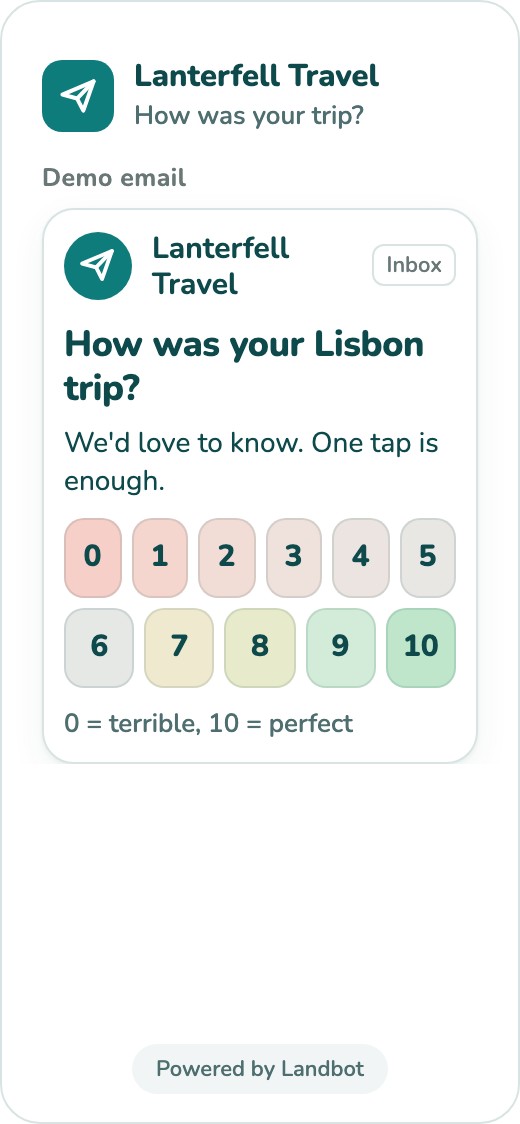
Answer one question from the email and continue the conversation on the web.
Email-embedded agent is a free Landbot AI agent template for marketing teams in general. Answer one question from the email and continue the conversation on the web. The agent opens from the email, answers it, continues and captures the lead. More replies than a standard CTA.
English
General
Main goal
Turn email clicks into conversations
What you gain
More replies than a standard CTA
Conversion agent vs static form
An email links to a landing page. The agent answers one question and continues on the web
How does this agent work?
Each step is a visible Landbot flow you can open and edit in the builder.
- First answer comes from the email click
- No repeated questions
- One question per message
- Ends with a clear next step
Opens from the email
The visitor clicks one answer in the email.
Answers it
Responds to that choice on the web.
Continues
Offers the next step in the conversation.
Captures the lead
Books, buys or signs up.
This agent, with your brand, in one paste
Paste the prompt into Claude, ChatGPT, Claude Code or Codex. Your AI connects to Landbot, builds the agent in your account and sends you a link to try it and a link to edit it.
- 1Copy the prompt. It includes the steps to connect Landbot if your AI isn't connected yet.
- 2Paste it in a new chat. Claude, ChatGPT, Claude Code or Codex.
- 3Try your agent. Your AI publishes it and walks you through testing it on your phone with Landbot’s WhatsApp test number.Your AI publishes it and sends you a link to try it in your browser and one to edit it in Landbot.
Email-embedded agent
Use the Landbot MCP tools to build my own version of the "Email-embedded agent" experience from the Landbot Experience Library, for [your company] ([your website, or "no website"]): Answer one question from the email and continue the conversation on the web. I need it for: starting the conversation inside my emails: people answer a question in the email and carry on from there. Live example (invented brand: Lanterfell Travel): https://landbot.pro/v3/H-3547997-PJ8TAINGSFWNAA9N/index.html . Open it and go through it before you build. I want that kind of experience, with its layout and the way a visitor moves through it, not a plain chat with bubbles and buttons. Its look and behaviour come from the bot's Custom CSS and Custom JS, and I'm asking you for both. You can read them in its setup at https://storage.googleapis.com/landbot.pro/v3/H-3547997-PJ8TAINGSFWNAA9N/index.json ("style" is the CSS, "foot" is the script). They were written together for that flow: start from both, keep them in step with the flow you build, and check on the published link that it looks and works like the example. Don't keep the example's brand name, texts or data. Where the example and my description above differ, follow the description. Decide whether an AI agent makes this better for my visitors: if it does, put Landbot's AI Agent block at its heart and give it what it needs to answer well (knowledge, clear instructions and limits); if not, keep it a guided flow. Either way, make sure every answer leaves the visitor a next step. Use what you already know about me and my business to make it relevant and tailored to us. Use my business name as the header title and browser tab title. If I have a website, take my colours, font and square icon (as the bot avatar) from it; if not, pick colours and a font that suit us. Make sure every text, including button labels, is easy to read (contrast at least 4.5:1). Make sure every step leaves the visitor a next step. When a visitor leaves their contact details, email me at [your email] with what they shared. I'll test it and change it after. If something needs a Landbot plan or add-on I may not have, leave it out, give visitors a simple way to contact me in its place, and tell me what you left out. During this build, create a new bot and never change a bot you didn't create in this conversation. When you hand it back, tell me the bot's ID and confirm it is new. When it's ready, publish it and send me two links: one to try it in my browser and one to edit it in Landbot.
We set up voice agents with you
Phone numbers, call routing and voice need a short setup call. Book one and we'll build this agent with your team.
Book a call →With Landbot, you can customize everything
Copy the prompt. Your AI assistant builds the agent in Landbot
Engage audience
See all
Frequently asked questions
What does the Email-embedded agent template do, and who is it for?
Answer one question from the email and continue the conversation on the web. It is built for marketing teams in general whose goal is to turn email clicks into conversations. The agent at the top of this page is the real thing: try it before you sign up.
How does the conversation work, step by step?
The visitor goes through 4 steps: Opens from the email, Answers it, Continues, Captures the lead. Along the way the agent follows a few fixed rules, such as: first answer comes from the email click. Every step is a visible block on the Landbot canvas, so you can change questions, logic and copy without code.
What results can I expect from this agent?
More replies than a standard CTA. It works 24/7, in the moment of intent, and every answer lands in your CRM as a complete record instead of a half-filled form.
Why use a conversion agent instead of a static form here?
An email links to a landing page. The agent answers one question and continues on the web. If you want proof with your own numbers, run the agent on one page, A/B test it against your current form for two weeks and compare qualified leads in your CRM.
Where can I publish it: website, WhatsApp or both?
On your website as a chat widget, embedded in a page or as a full-page agent, and on WhatsApp with WhatsApp Pro. The flow you build runs on every channel unchanged, so you design it once.
Which CRMs and tools does it connect to?
HubSpot natively, plus Salesforce, Google Sheets and any other tool through webhooks, the API, Zapier or Make. Slack and Calendly connections also work, so the agent can alert your team and book the meeting in the same conversation.
Can I build it with Claude, ChatGPT or another AI assistant?
Yes. Connect the Landbot MCP to Claude, Claude Code, ChatGPT, Codex, Cursor or any assistant with MCP, sign in to Landbot once and paste this template's prompt. Your assistant builds the agent in your account with your brand, and nothing goes live until you publish it.
How much does it cost, and is there a free trial?
Landbot starts at €40/mo (Starter: 500 chats, 100 AI chats, 2 seats) and €100/mo for Pro with HubSpot, webhooks and lead scoring. AI chats are included in every paid plan. Every paid plan starts with a 14-day free trial and no credit card, enough to test this template on a real page.
Do I need a developer to launch it?
No. The template is a no-code flow on a visual canvas: swap in your brand, connect your CRM and publish.
Access 55+ AI agent templates
Get started freeFree plan available · No credit card required · Setup in minutesconversion agents with Landbot
{"@context":"https://schema.org","@graph":[{"@type":"WebPage","@id":"https://landbot.io/ai-agent-templates/email-embedded-agent","url":"https://landbot.io/ai-agent-templates/email-embedded-agent","name":"Email-embedded agent","description":"Email-embedded agent is a free Landbot AI agent template for marketing teams in general. Answer one question from the email and continue the conversation on the web. The agent opens from the email, answers it, continues and captures the lead. More replies than a standard CTA.","isPartOf":{"@type":"WebSite","name":"Landbot","url":"https://landbot.io"},"breadcrumb":{"@id":"https://landbot.io/ai-agent-templates/email-embedded-agent#breadcrumb"}},{"@type":"BreadcrumbList","@id":"https://landbot.io/ai-agent-templates/email-embedded-agent#breadcrumb","itemListElement":[{"@type":"ListItem","position":1,"name":"Home","item":"https://landbot.io/"},{"@type":"ListItem","position":2,"name":"AI agent templates","item":"https://landbot.io/ai-agent-templates"},{"@type":"ListItem","position":3,"name":"Engage audience","item":"https://landbot.io/ai-agent-templates?useCase=Engage%20audience"},{"@type":"ListItem","position":4,"name":"Email-embedded agent","item":"https://landbot.io/ai-agent-templates/email-embedded-agent"}]},{"@type":"HowTo","@id":"https://landbot.io/ai-agent-templates/email-embedded-agent#howto","name":"How the Email-embedded agent agent works","step":[{"@type":"HowToStep","position":1,"name":"Opens from the email","text":"The visitor clicks one answer in the email."},{"@type":"HowToStep","position":2,"name":"Answers it","text":"Responds to that choice on the web."},{"@type":"HowToStep","position":3,"name":"Continues","text":"Offers the next step in the conversation."},{"@type":"HowToStep","position":4,"name":"Captures the lead","text":"Books, buys or signs up."}]}]}