
Customer Support Automation: Resolve More Tickets with AI Agents
Most support teams spend hours answering the same repetitive questions. Let an AI agent handle those, freeing your team for the conversations that need a person.
.avif)
How to automate customer support?
Customer support automation uses AI agents and rule-based flows to resolve routine tickets — FAQs, status checks, intake — without a human on every interaction, while keeping people on the complex cases that need judgment. This guide covers what to automate, how to build the flows, and how to measure whether they’re working.
Modern B2B teams are turning to automated customer support to resolve more tickets at lower cost without adding headcount. The question isn't whether to automate — it's which interactions to automate, how to design the flows, and how to measure whether it's working. Done well, automation absorbs the repetitive, predictable volume that eats up a support team's day and routes everything else to a human with full context.
1. What is customer support automation?
The definition
Customer support automation is the use of software — rule-based flows, AI models, or a combination of both — to handle customer inquiries, route requests, and resolve tickets without requiring a human agent for every interaction.
In a traditional setup, every inbound query goes through a human: response time scales with headcount, cost per ticket is fixed at labor rates, and quality becomes inconsistent across agents and shifts. Automation breaks all three constraints — but a scripted bot and an AI agent break them in very different ways.
Support bot vs. AI support agent
A support bot follows a script: if the customer says X, respond with Y. It works for rigid, predictable queries and falls apart the moment the conversation doesn’t match the script.
An AI support agent understands intent, navigates ambiguity, and takes action — checking order status, updating account details, filing a ticket, or routing to the right team — without a predefined response tree.
That distinction — script vs. judgment — is what determines whether an automation holds up under real support volume.
For a deeper look at how AI agents work architecturally — memory, tool use, and LLM selection — see Landbot’s AI Agent Foundations guide.
2. The business case for automating customer support
The cost structure problem
Human-staffed support scales in a straightforward but costly way: every unit of service delivery requires a proportional unit of labor. Volume spikes — product launches, outages, seasonal peaks — hit the team directly. Night shifts and weekend coverage require either expanding the rota or accepting gaps in coverage.
The math compounds. A support team handling 1,000 tickets per week at an average cost of €8 per ticket (agent time + tooling overhead) runs at €8,000/week. Automate a significant share of those tickets and the same team handles the same volume at a fraction of the cost — with faster first response across the board.
Real results from automated support
These examples show what operational automation looks like in practice. Three examples show what operational automation looks like in practice:
- Hotelbeds automated more than 13,000 conversations in four weeks during a COVID-related surge, handling 350,000 user queries through a self-service WhatsApp and Messenger chatbot — without expanding their support team. The flow used conditional logic to personalize the experience by channel, language, and brand (Hotelbeds vs. Bedsonline), paired with natural language processing to catch phrasing around refunds, cancellations, and modifications without requiring exact keyword matches.
- Plum filed 400 insurance claims per month via WhatsApp automation, with 80% completed through automated flows and a 60% reduction in claim processing time. Plum's rollout also saw an 85% opt-in rate on WhatsApp.
Crisis response, claims intake — both are high-volume, well-defined processes handed to an AI agent, with a clear path back to a human when the case falls outside the script. The pattern across these cases is consistent: automation doesn't replace good support — it removes the friction that prevents good support from scaling.
The metrics that drive approval
When building the internal business case for support automation, the numbers that move approvals are:
Automation should move deflection rate and FRT upward while bringing cost per ticket down. If CSAT drops as a result of automation, the automation scope or handoff design needs adjustment — not the automation strategy itself.
Build your customer support automation — without code.
Build your first agent.svg)
Free plan available
No credit card required
Setup in minutes
3. Drawing the line: what to automate vs what to keep human
Not everything in customer support benefits from automation. Some interactions gain from it — faster, more consistent, always available. Others require human judgment that current AI cannot replicate without real quality loss. The decision is operational, not ideological.
%201.avif)
Pattern 1: Automate volume, not complexity. Automate queries that are high-volume and low-variance: FAQ answers, order status checks, account lookups, reset flows, appointment scheduling, basic troubleshooting guides. These queries are predictable — the right answer exists and is retrievable — and they don’t benefit from human warmth or judgment.
Pattern 2: Keep humans on complexity and emotional weight. Complaints involving emotional distress, high-value account issues, unscripted technical problems, and legal or regulatory questions belong with humans. Not because AI can’t generate a response, but because the cost of a wrong or tone-deaf response in these situations is materially higher than the cost of routing to an agent.
Pattern 3: Use AI for triage, not just resolution. Even for tickets destined for a human, automation adds value. A well-designed intake flow collects context (product, issue category, account tier, prior contacts), routes to the right team, and surfaces relevant knowledge base articles before the agent opens the ticket. This reduces handle time on the human side even when automation doesn’t resolve the ticket itself.
Pattern 4: Gate escalation cleanly. The most common failure mode in support automation isn’t bad AI — it’s a bad handoff. Define escalation triggers explicitly: sentiment threshold, keyword match, topic category, or explicit customer request. The handoff to a human should include the full conversation context. A customer who repeats their problem to a human agent after five minutes with a bot loses trust in both.
AI agent vs human agent: what changes operationally
Every mature support operation ends up blending AI and human capacity — the real question is which interactions go where, not which one wins. AI agents and human agents aren’t interchangeable; each is strongest on a different set of dimensions, from availability to judgment.
AI handles volume, speed, and consistency. Humans handle complexity, judgment, and trust-critical interactions. The right deployment is a designed combination of both — not a replacement of one with the other.
Which customer support queries should I automate first?
If you’re starting from zero, these five categories typically make up the largest share of inbound volume and have the clearest automation path:
- FAQ deflection. Answers to your most common questions, drawn from your existing knowledge base.
- Self-serve status lookups. Order status, ticket status, account details; anything that requires a database query, not a judgment call.
- Intake and routing. The first few turns of every support conversation, regardless of where it ends up.
- Appointment and callback scheduling. Structured, rules-based, integrates cleanly with calendar tools.
- Feedback collection. Post-interaction CSAT surveys, consistent across all channels.
4. How to implement customer support automation
Implementation is a staged process — not a single build. The steps below are designed to be completed in sequence, with human judgment driving the decisions at each stage and AI handling more of the execution as the system matures.
%201.avif)
Step 1: Audit your ticket volume by category. This step is entirely human-led. Pull 90 days of ticket data and group by category: FAQ, billing, technical, account management, complaint, escalation. Rank by volume. Ninety days is long enough to catch recurring patterns without going stale as your product evolves. The top 3 categories almost always account for the large majority of volume, and that’s where automation ROI concentrates.
Step 2: Map the resolution path for each top category. This is also a human exercise — you’re capturing institutional knowledge, not asking AI to invent it. For each high-volume category, document the resolution path a human agent follows: what information do they need from the customer? What do they look up? What action do they take? What does the customer need to know at the end? This flowchart is what your automation will replicate.
Step 3: Build the intake and routing layer. This is where AI starts doing real work, under human direction. Start with intake before building resolution flows. A well-designed intake layer — capturing intent, issue category, account context — has immediate value regardless of how much you automate downstream. It makes human agents faster and gives you the data to make better automation decisions over time.
Step 4: Build resolution flows for your top FAQ category. From here, AI drives the conversation, but you set the boundaries. Take the highest-volume, most predictable category from your audit and build the full resolution flow. The AI agent handles the conversation and knowledge retrieval; you configure the scope, the fallback paths, and the escalation triggers. Include: knowledge base retrieval, structured decision branches, and a clean handoff with context. Test with a real user group before deploying at scale.
Step 5: Deploy, measure, and iterate. This is where the relationship flips: AI runs the day-to-day, and your role shifts from builder to reviewer. Automation is not a deploy-and-forget operation. Track resolution rate, drop-off rate, escalation rate, and CSAT from day one. Set a review cadence — bi-weekly in the first 90 days. Update the knowledge base as you discover gaps. Add resolution flows for additional categories based on what volume data shows next.
Pro tip: Maintain a test suite of 25–30 representative conversations across your top query categories. Run it after every meaningful change and track completion rate, escalation rate, and error rate over time. Regression testing catches breakages that would otherwise surface as customer complaints.
5. AI agent for customer support: the four capabilities that matter in production
An AI support agent’s value in production comes down to whether it holds up under real support volume — typos, ambiguous phrasing, language switches, multi-turn conversations — without breaking down into escalations. These are the four capabilities that determine whether it does, or becomes a source of them.
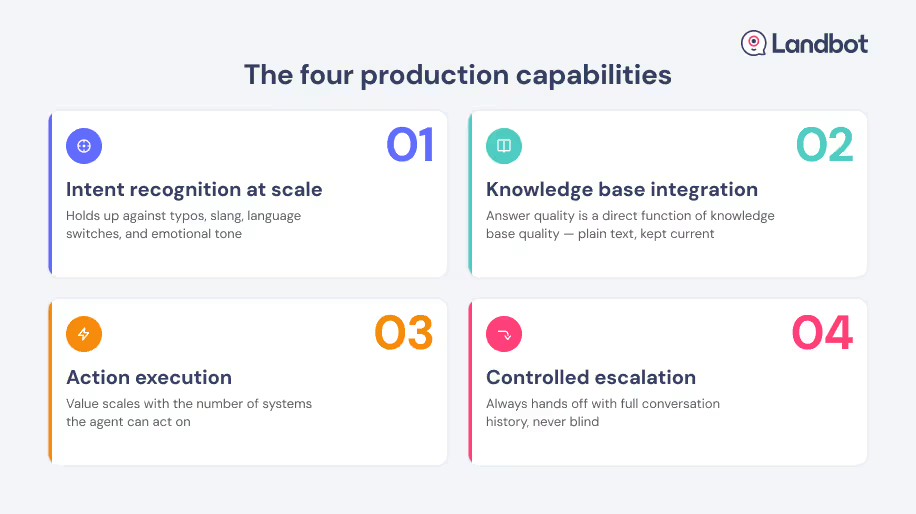
Capability 1: Intent recognition at scale. A production-grade AI support agent classifies intent correctly for high-volume, real-world inputs — including typos, ambiguous phrasing, language switches, and emotional language. This isn’t a threshold to cross once; it’s a metric to monitor continuously as query patterns evolve.
Capability 2: Knowledge base integration. The agent’s answer quality is a direct function of your knowledge base quality. AI retrieval is only as good as what it retrieves from. A well-structured, regularly updated knowledge base is an operational prerequisite, not a nice-to-have. Keep it in plain text; update it whenever products or policies change.
Capability 3: Action execution. The most valuable AI support agents don’t just answer questions — they take actions: looking up an order, resetting a password, creating a ticket, updating an account field, scheduling a callback. Every action requires an integration. The agent’s value scales directly with the number of systems it can act on.
Capability 4: Controlled escalation. Define the conditions under which the AI agent hands to a human: explicitly (customer requests it), by category (complaint, legal, billing dispute), by sentiment (negative threshold exceeded), or by resolution failure. The handoff should include the full conversation history so the human agent doesn’t start blind.
Connect your support channels into one AI agent layer.
Build your first agentFree plan available
No credit card required
Setup in minutes
6. Customer support automation across channels
Website: the entry point for most support queries
Most support queries originate on the website — at the pricing page, the help center, the product page, or during a failed checkout flow. Website-based support automation captures these intent signals in context: the visitor’s current page, their session history, and their immediate behavior all inform what kind of help they need.
An AI agent deployed on the website doesn’t wait for a visitor to navigate to a contact page. It activates at intent signals — time on page, scroll depth, repeated visits to pricing — and opens a support conversation in context. The agent qualifies the query, routes it, or resolves it in-page.
For a deeper look at how AI agents personalize and convert the entire visitor experience — not just support — see the Agentic Website Experience guide.
WhatsApp: where your customers already are
WhatsApp is now a primary support channel for businesses across Europe, LatAm, and MENA. The advantage is structural, not novelty: open rates on WhatsApp run above 90%, far ahead of email, because it’s an app customers already have open rather than a destination they have to remember to visit.
That familiarity changes the tone of the interaction — it reads as a conversation, not a ticket in a queue — which lowers the friction for a customer to reach out in the first place. It’s also asynchronous by default: a customer can start a conversation, step away, and pick it back up later without losing context, which matters for support volume that doesn’t arrive on a 9-to-5 schedule.
WhatsApp support automation has specific compliance and setup requirements — WABA approval, opt-in flows, message template rules — that differ from web deployment.
For the full picture of how to build a WhatsApp automation system — API access, AI agent setup, compliance, use cases, and platform selection — check out Landbot's WhatsApp Business Automation guide.
Multi-channel consistency: the design constraint that matters
Support queries arrive across multiple channels — website widget, WhatsApp, email, in-app. The customers behind those queries don’t distinguish between channels. When a customer contacts you on WhatsApp after filling out a web form, they expect you to have context from the first interaction.
Multi-channel consistency requires two things: a unified contact record (your CRM is the source of truth) and consistent AI behavior across channels (the same intent recognition, the same knowledge base, the same escalation logic). Build both before deploying automation across channels, not after.
7. How to measure customer support automation performance
Measuring automation performance requires three layers of metrics: volume (is the automation handling meaningful load?), quality (is it handling it well?), and cost (is it delivering business value?). Each layer answers a different question, and together they give you the complete picture for a QBR or budget conversation.
Volume metrics
- Deflection rate: the percentage of total inbound queries resolved by automation without escalation. Track this as your primary headline metric — it reflects how much load the automation is genuinely absorbing.
- Bot completion rate: the percentage of bot-initiated conversations that reach a defined end state (resolved, escalated, or scheduled). Drop-off rate is the inverse — a high drop-off signals a friction point in the flow.
- Coverage rate: the percentage of query types your automation has a trained response for versus total query categories in your ticket taxonomy. Low coverage explains low deflection.
Quality metrics
- CSAT post-automation: customer satisfaction score from automated interactions. Benchmark against your human-agent CSAT. A well-designed AI agent should match or approach human CSAT on the queries it handles.
- Escalation rate: the percentage of conversations passed to a human. Not inherently negative — escalation for complex issues is correct behavior. Watch for unexpected escalation spikes, which signal automation gaps.
- Error rate / fallback rate: how often the AI agent fails to recognize intent or retrieve a relevant answer. This is the primary input for knowledge base update priorities.
Cost metrics
- Cost per ticket resolved: total automation tooling cost divided by tickets resolved by automation. Compare against fully-loaded human agent cost per ticket.
- Agent time saved: hours freed from tier-1 queries multiplied by agent hourly cost. The most legible number for budget owners in QBR reporting.
- FRT improvement: first response time before versus after automation. Quantifiable, directly linked to CSAT, and easy to present as a before/after ratio.
Setting the right baseline before you launch
Measure your current state before deploying automation: ticket volume by category, average FRT, cost per ticket, CSAT, and escalation rate. These become your baseline. Reporting results without a baseline is how automation projects lose credibility internally — and miss the data that justifies the next phase of investment.
8. FAQs
FAQs about customer support automation
Customer support automation is any system — AI-driven, rule-based, or a mix of both — that resolves a customer's request without a human handling that specific interaction. Instead of every FAQ, status check, or intake question landing in an agent's queue, automation absorbs the predictable volume directly and hands off only what genuinely needs a person.
A support bot only works within a fixed script. It can respond to inputs it was explicitly built to expect, and nothing else. An AI support agent isn't limited to a decision tree: it interprets what the customer actually means, retrieves the right answer from your knowledge base, and can take action — creating a ticket, updating a record — even for questions nobody scripted in advance.
Start with your highest-volume, most predictable query categories: FAQ deflection, order or ticket status lookups, intake and routing, and appointment scheduling. Run 90 days of ticket data, rank by volume and predictability, and automate the top 3 categories before expanding scope.
A first functional version — covering FAQ deflection and basic routing — can be in production in under a week using a no-code builder. Full automation across multiple query categories, integrated with CRM and helpdesk tools, typically takes 3–6 weeks depending on knowledge base quality and integration complexity. The limiting factor is usually the knowledge base, not the platform.
Not when designed well. Automation that resolves the right queries quickly and hands off complex ones with full context typically maintains or improves CSAT. The risk is poorly scoped automation — agents that try to handle everything, or handoffs that force the customer to repeat their problem.
Yes. WhatsApp is one of the most effective channels for support automation — it’s where many customers already message, interactions feel conversational rather than formal, and AI agents handle FAQs, routing, and lookups natively.
At minimum: your knowledge base (the source for AI answers), your helpdesk or ticketing system (for ticket creation and routing), and your CRM (for customer context). Optional but high-value: calendar integration for scheduling, payment systems for billing queries, and product database for order or account lookups. Landbot's integrations library covers all of these natively, so most of this list is a connection, not a build.
Yes — and it’s particularly well-suited because B2B SaaS support queries tend to be high-volume, structured, and product-specific (onboarding, feature questions, integration issues), which are exactly the query types automation handles best. The escalation path to a human CSM or technical specialist is also cleaner in B2B contexts because the tier structure is well-defined.
Define the scope of what the agent is authorized to answer. AI agents built on structured platforms operate within the flows you configure — they don’t improvise outside the defined scope. Keep your knowledge base to verified, current information only. Build explicit fallback paths (topic not recognized → escalation) rather than allowing the agent to generate responses outside its knowledge base. Test against edge-case inputs before production deployment.
Workflow automation handles internal processes — routing tickets between teams, updating CRM fields, triggering email notifications. Customer support automation handles the customer-facing conversation: answering queries, collecting information, resolving issues. In practice, the two work together: a support AI agent completes the customer interaction, then workflow automation routes the resulting data downstream to the right systems.
Work only the tickets that need a human
An AI agent handles the rest — FAQ deflection, lookups, routing, and scheduling — live in minutes, no code required.
Free plan available
No credit card required
Setup in minutes