From David Arnoux's GTM Playbook

Your Ads Are Fine.
Your Landing Page Is Losing the Deal.

Most B2B teams optimize for clicks and form fills. But your landing page treats every visitor the same: VP with budget or student doing research. This playbook shows you how to fix that.

Build It Free
  • Plugs into your existing Google Ads — zero setup changes
  • First keyword intent report within 24 hours
  • No developer resources needed
David Arnoux
David Arnoux Co-founder, Growth Tribe GTM Playbook

David Showed You the System. Here's How to Build It.

Landbot powers the whole thing. No webhooks. No developer ticket.

1 Qualify
2 Classify
3 Route
4 Feedback

Static Pages Can't Qualify Demand.

Your landing page collects a name and hands the lead to sales. The issue isn't your targeting or budget — it's that your website can't tell a real buyer from a bad click.

Budget leak you can't see

Your campaigns report clean numbers: clicks, CPL, conversion rate. But none of it tells you which "conversions" will ever buy anything.

The wrong feedback loop

Smart Bidding learns from your signals. When the signal is broken, it doubles down on the wrong audience.

Sales time wasted on no-fit leads

Your reps can tell within 60 seconds. Your landing page still can't.

This Is What Your Ad Report Should Actually Show You.

Within 24 hours of going live, you'll see which keywords bring visitors who are actually evaluating your solution — and which ones bring traffic that will never convert.

Very fit Could fit No fit No conversion

Data from an initial pilot campaign targeting conversational marketing keywords. Results will vary by industry and keyword set.

Compatible with Google Ads offline conversions Enhanced conversions for leads ready Works with HubSpot & Salesforce

Replace the Static Form. Build a Page That Qualifies.

An agentic website doesn't just capture leads, it understands them. In real time. Before you've spent a cent on follow-up.

Step 1 — Qualify in real time

A 60-second AI conversation captures what the visitor actually needs.

Their role, team size, use case, and timeline. Structured data, not a blank form field.

1
Visitor classified into intent buckets
2
Step 2 — Classify intent into buckets

Not every visitor is equal. The agent labels each one automatically.

High fit, low fit, not now, wrong segment. Every lead that reaches your CRM is already labeled.

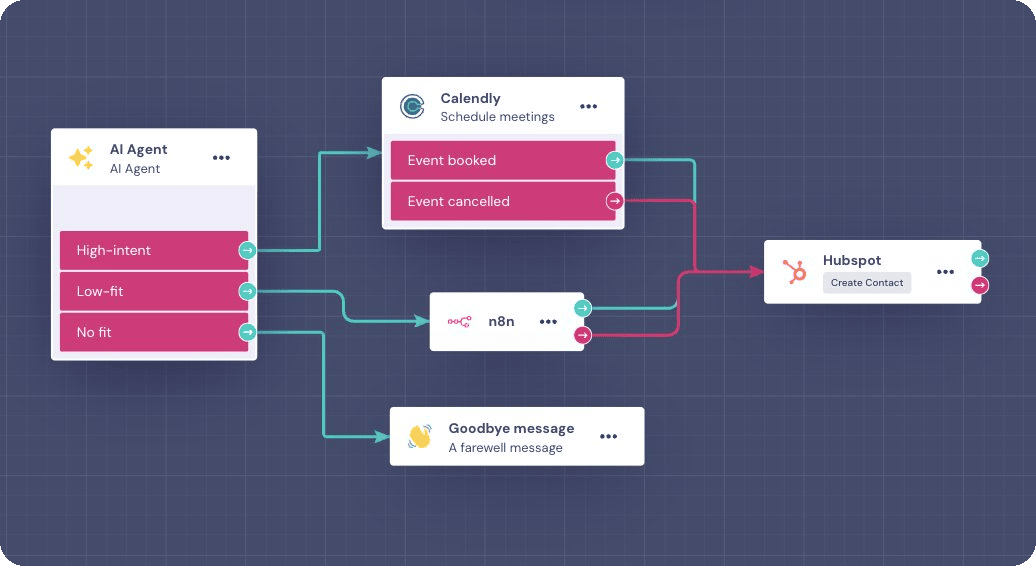
Step 3 — Route to the right next step

Every visitor gets a personalized path instead of a generic thank-you page.

High-intent visitor? Book a meeting directly. Low-fit? Send to content. Wrong segment? Politely off-ramp.

3
High-intent visitor routed to a meeting booking
4
Step 4 — Feed intent back to your ad platforms

Your algorithm learns what a real buyer looks like.

Qualification outcomes — meeting booked, high-intent, no-fit — flow back to Google Ads and LinkedIn as offline conversion signals.

Developer-Level Power. No Developer Required.

Your brand, your flow

Full UI customization. The experience looks and feels like your website, not a chatbot widget bolted on the side.

Built in hours, not sprints

The AI Copilot guides you through setup. Most teams have a first version live the same day.

Connects to everything you already use

Native two-way connectors to HubSpot, Salesforce, Google Ads, and more. No fragile webhooks. No duct tape.

The Playbook Is Ready.
Your Page Should Be Too.

Start with a free Landbot account. Use the intent qualification template David's playbook is built on. Have something live before your next campaign.

Free to start No developers needed Live in hours